Talos launch kubernetes in aws environment getting started
the all talos nodes don’t enable public ip, can use private subnet and vpc ip cidr
Operate workflow
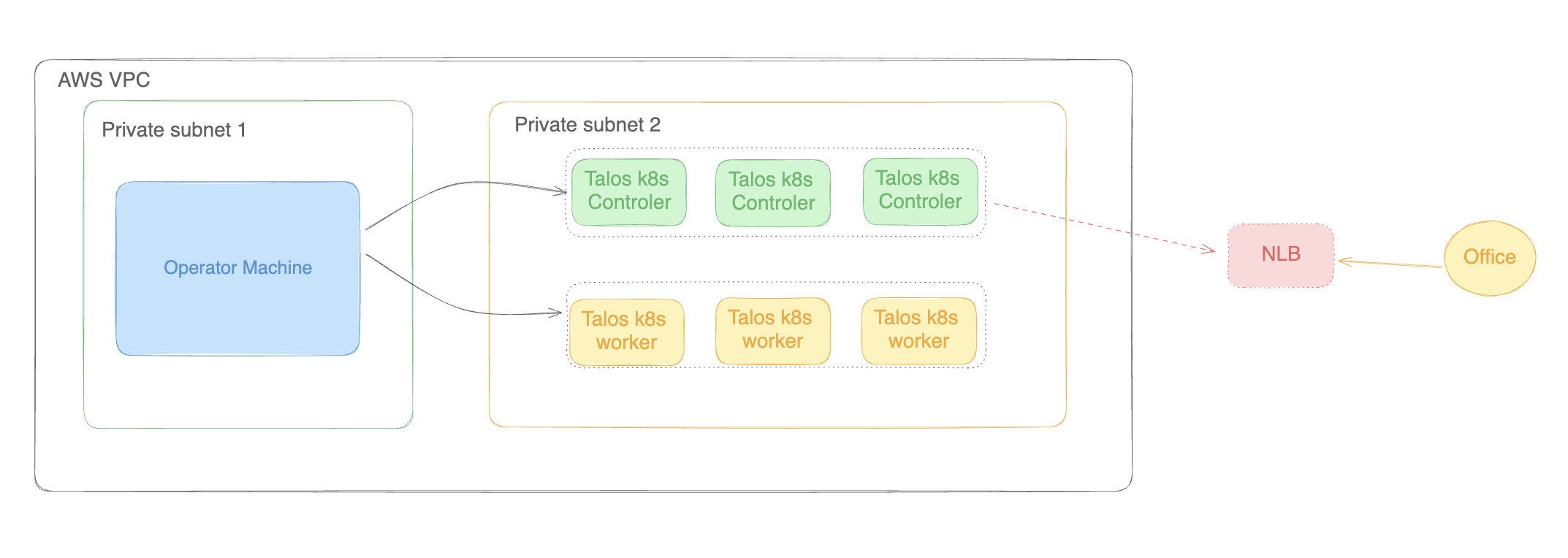
- Installation the
talosctlto operator machine talosctl - Create aws resources
- VPC
- Subnet
- SecurityGroup
- NetworkLoadbalancer : listener tcp 443 forward to control plane nodes tcp: 6443
- TargetGroup: for control plane port tcp: 6443
- Setup the environment variables, the
talosctlcommand generate config file need the Env Variables
1REGION="us-east-1"
2VPC="vpc-xxxxxx"
3SUBNET="subnet-xxxxxx"
4AMI=`curl -sL https://github.com/siderolabs/talos/releases/download/v1.7.5/cloud-images.json | jq -r '.[] | select(.region == "'$REGION'") | select (.arch == "amd64") | .id'`
5SECURITY_GROUP="sg-xxxxx"
6LOAD_BALANCER_ARN="arn:aws:elasticloadbalancing:us-east-1:xxxxx:loadbalancer/net/talos-aws-tutorial-lb/xxxx"
7TARGET_GROUP_ARN="arn:aws:elasticloadbalancing:us-east-1:xxxxx:targetgroup/talos-aws-tutorial-tg/xxxxx"
- Resolution the custom domain CNAME to load blancer
- Generate the config file
1    talosctl gen config talos-k8s-aws-tutorial https://talos.test-aws.dev:443 --with-examples=false --with-docs=false
2    talosctl validate --config controlplane.yaml --mode cloud
3    talosctl validate --config worker.yaml --mode cloud
- Create the control plane nodes
 1CP_COUNT=1
 2while [[ "$CP_COUNT" -lt 4 ]]; do
 3  aws ec2 run-instances \
 4    --region $REGION \
 5    --image-id $AMI \
 6    --count 1 \
 7    --instance-type t3.small \
 8    --user-data file://controlplane.yaml \
 9    --subnet-id $SUBNET \
10    --security-group-ids $SECURITY_GROUP \
11    --tag-specifications "ResourceType=instance,Tags=[{Key=Name,Value=talos-aws-tutorial-cp-$CP_COUNT}]"
12  ((CP_COUNT++))
13done
- Create the worker nodes
1aws ec2 run-instances \
2    --region $REGION \
3    --image-id $AMI \
4    --count 3 \
5    --instance-type t3.small \
6    --user-data file://worker.yaml \
7    --subnet-id $SUBNET \
8    --security-group-ids $SECURITY_GROUP \
9    --tag-specifications "ResourceType=instance,Tags=[{Key=Name,Value=talos-aws-tutorial-worker}]"
- Bootstrap Etcd
1talosctl --talosconfig talosconfig config endpoint <control plane 1 PUBLIC IP>
2talosctl --talosconfig talosconfig config node <control plane 1 PUBLIC IP>
3talosctl --talosconfig talosconfig bootstrap
- Retrive the kubeconfig
 1# talosctl --nodes x.x.x.x kubeconfig
 2# create the kubeconfig from one of controle plane
 3talosctl --talosconfig talosconfig kubeconfig .
 4
 5# view the services logs
 6talosctl -n 1.1.1.0 --talosconfig talosconfig services
 7#view the dmesg logs
 8talosctl -n 172.20.1.2 dmesg
 9# edit the machineconfig
10talosctl edit machineconfig --talosconfig talosconfig -n 1.1.1.2
Useful commands
 1# check etcd status
 2alosctl --talosconfig talosconfig -n <CP1>,<CP2>,<CP3> etcd status
 3# patch the machineconfig
 4# cluster:
 5#  apiServer:
 6#    admissionControl:
 7#      - name: PodSecurity
 8#        configuration:
 9#          exemptions:
10#            namespaces:
11#              - rook-ceph
12#              - kube-system
13talosctl patch --mode=no-reboot machineconfig  --talosconfig talosconfig -n 1.1.1.2 --patch @ceph-patch.yaml
14
15# copy config to default folder
16cp ./talosconfig ~/.talos/config
17# view all nodes status
18talosctl get members
19# view the pod security admission
20talosctl get admissioncontrolconfigs.kubernetes.talos.dev admission-control -o yaml
21# to allow the privileged to namespace
22kubectl label ns default pod-security.kubernetes.io/enforce=privileged